> ## Documentation Index
> Fetch the complete documentation index at: https://docs.altheia.xyz/llms.txt
> Use this file to discover all available pages before exploring further.
# Quickstart
> Install @altheia-xyz/sui, run a five-line agent on testnet, see allowed and denied.
You'll provision an agent in the dashboard, then run a Node script that acts as the agent: it builds a DeepBook swap, the on-chain policy decides, and you see one allowed action and one denied. The agent needs only its private key. `agentRefs` derives the vault, policy, and cap from the `AgentCap` it owns on chain.
## Prerequisites
Install a Sui wallet (Sui Wallet, Suiet, or similar) and switch the network to **Testnet**.
Use the Sui testnet faucet to fund your operator wallet. Provisioning an agent costs gas plus the budget you deposit into the vault.
`node -v` should report 20 or higher.
## 1. Provision an agent
Open [altheia.xyz/sui](https://altheia.xyz/sui), connect your Sui wallet on testnet, and click **Create Agent**. The dashboard provisions the vault, the `Policy`, and the agent's `AgentCap` in one owner signature, funds the agent key with gas, and shows you the agent's private key once.
Set a tight policy to start. The demo below assumes:
| Field | Value |
| --------------- | ----------------- |
| Budget asset | SUI |
| Per-tx cap | `0.5 SUI` |
| Per-day cap | `2 SUI` |
| Allowed actions | `swap` |
| Scope | the DeepBook pool |
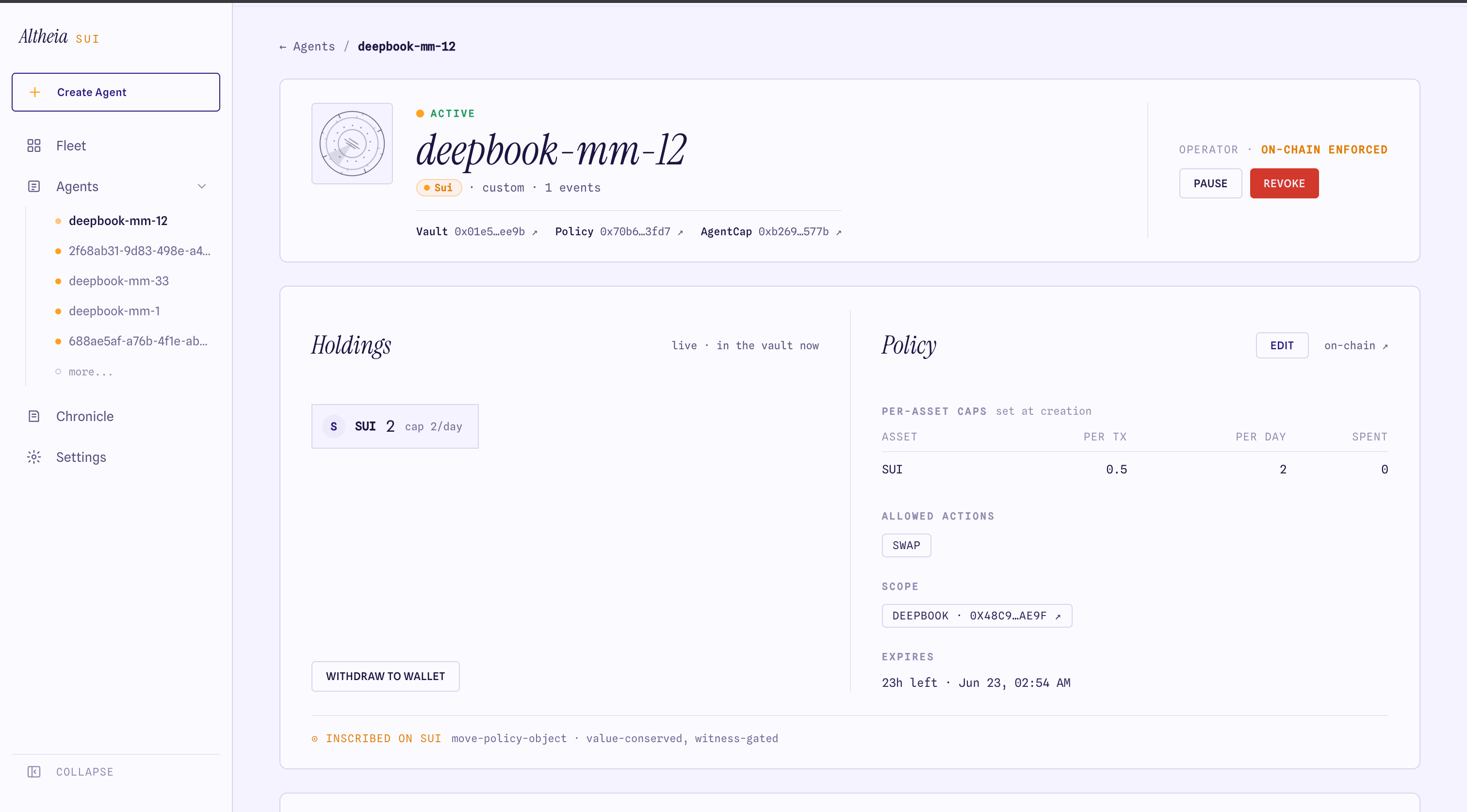 Save the agent private key. It is the only secret the agent process needs. See [Provision an agent](/guides/provision-agent) for every field.
## 2. Install the SDK
```bash theme={null}
mkdir altheia-hello && cd altheia-hello
npm init -y
npm i @altheia-xyz/sui
npm i -D tsx
```
`@altheia-xyz/sui` re-exports the `@mysten/sui` primitives an agent author needs, so your project imports one package and there is one copy of `@mysten/sui` in play.
Create `.env`:
```bash theme={null}
AGENT_PRIVKEY=suiprivkey1... # the agent key from the dashboard
```
## 3. The agent, in about five lines
Create `hello.ts`:
```ts hello.ts theme={null}
import {
SuiJsonRpcClient, getJsonRpcFullnodeUrl, Ed25519Keypair, decodeSuiPrivateKey,
AltheiaSui, keypairExecutor, agentRefs, decodePolicyAbort,
} from "@altheia-xyz/sui";
const client = new SuiJsonRpcClient({ url: getJsonRpcFullnodeUrl("testnet"), network: "testnet" });
const kp = Ed25519Keypair.fromSecretKey(decodeSuiPrivateKey(process.env.AGENT_PRIVKEY!).secretKey);
// agentRefs derives the vault/policy/cap from the AgentCap the agent owns.
const refs = await agentRefs(client, kp.getPublicKey().toSuiAddress());
const agent = new AltheiaSui(client, refs, keypairExecutor(client, kp));
async function swap(label: string, amount: bigint) {
try {
const r = await agent.swap(amount);
console.log(`${label}: allowed`, r.digest);
} catch (e) {
const ab = decodePolicyAbort(e);
console.log(`${label}: denied`, ab?.reason_code ?? "(non-policy failure)");
}
}
await swap("within cap", 50_000_000n); // 0.05 SUI, under the 0.5 cap
await swap("over cap", 2_000_000_000n); // 2 SUI, over the per-tx cap
```
Run it:
```bash theme={null}
npx tsx --env-file=.env hello.ts
```
## 4. What allowed and denied look like
```
within cap: allowed 7Kf3... # the swap PTB landed; the audit event indexes it
over cap: denied over_per_tx_cap
```
The allowed swap routes through `policy::check_and_consume`, which records the spend against the per-day cap and emits an `AllowedAction` event. The over-cap swap aborts inside the contract before any coin leaves the vault. `decodePolicyAbort` maps the Move abort code to a stable reason.
The swap is a **policy decision**, not a guaranteed fill. The agent submits a gated DeepBook order; on a thin testnet book it may fill zero. Allowed means the policy permitted the action and the transaction landed. It does not assert the order filled.
To record denials without spending gas, dry-run first with [`guardedSubmit`](/sdk/guarded-submit): a policy abort is logged and the submit is skipped.
## 5. Verify in the dashboard
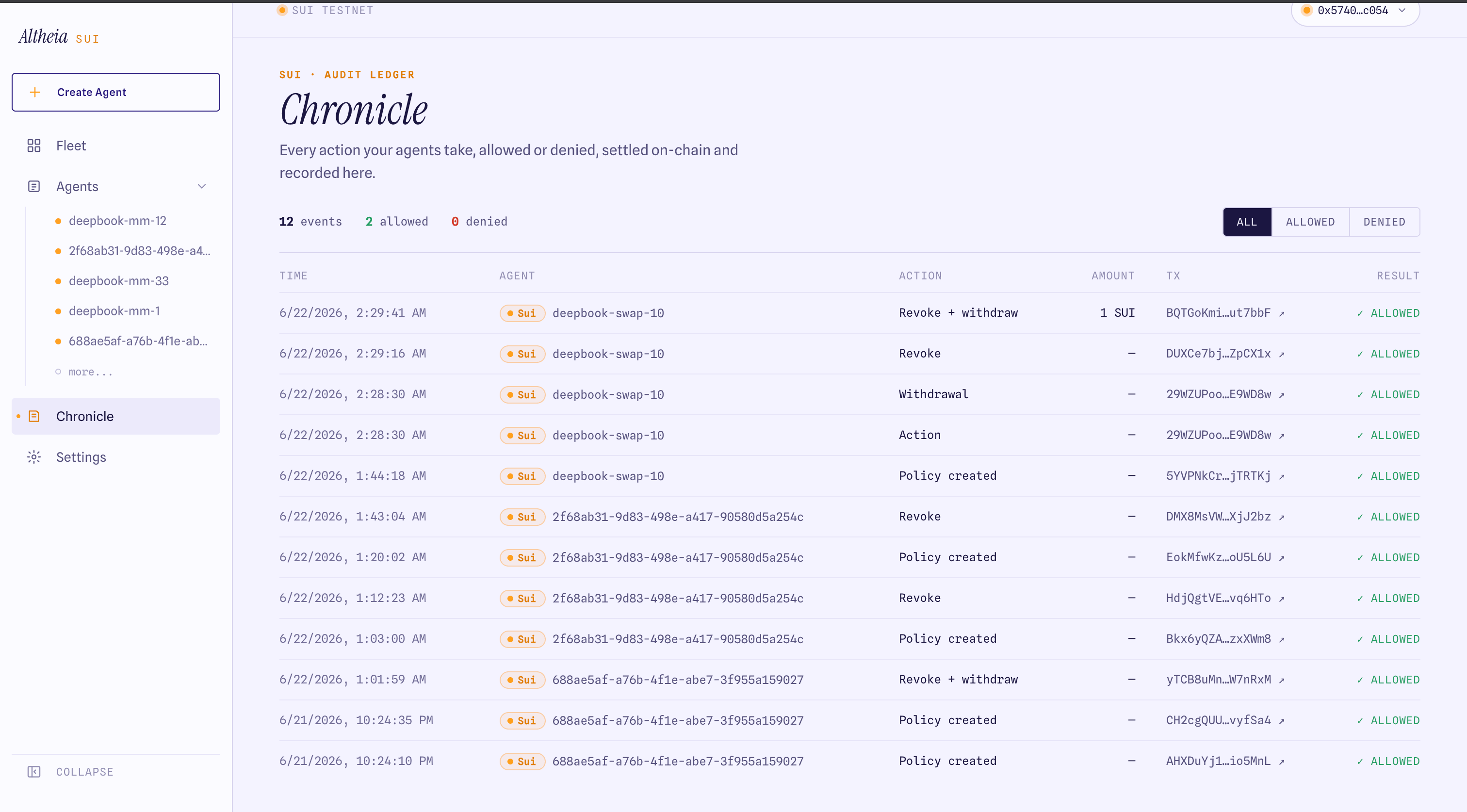
Open the agent in the dashboard. The Chronicle shows the audit ledger: the allowed swap settled on-chain, and (if you used `guardedSubmit`) the denied attempt with its reason.
Save the agent private key. It is the only secret the agent process needs. See [Provision an agent](/guides/provision-agent) for every field.
## 2. Install the SDK
```bash theme={null}
mkdir altheia-hello && cd altheia-hello
npm init -y
npm i @altheia-xyz/sui
npm i -D tsx
```
`@altheia-xyz/sui` re-exports the `@mysten/sui` primitives an agent author needs, so your project imports one package and there is one copy of `@mysten/sui` in play.
Create `.env`:
```bash theme={null}
AGENT_PRIVKEY=suiprivkey1... # the agent key from the dashboard
```
## 3. The agent, in about five lines
Create `hello.ts`:
```ts hello.ts theme={null}
import {
SuiJsonRpcClient, getJsonRpcFullnodeUrl, Ed25519Keypair, decodeSuiPrivateKey,
AltheiaSui, keypairExecutor, agentRefs, decodePolicyAbort,
} from "@altheia-xyz/sui";
const client = new SuiJsonRpcClient({ url: getJsonRpcFullnodeUrl("testnet"), network: "testnet" });
const kp = Ed25519Keypair.fromSecretKey(decodeSuiPrivateKey(process.env.AGENT_PRIVKEY!).secretKey);
// agentRefs derives the vault/policy/cap from the AgentCap the agent owns.
const refs = await agentRefs(client, kp.getPublicKey().toSuiAddress());
const agent = new AltheiaSui(client, refs, keypairExecutor(client, kp));
async function swap(label: string, amount: bigint) {
try {
const r = await agent.swap(amount);
console.log(`${label}: allowed`, r.digest);
} catch (e) {
const ab = decodePolicyAbort(e);
console.log(`${label}: denied`, ab?.reason_code ?? "(non-policy failure)");
}
}
await swap("within cap", 50_000_000n); // 0.05 SUI, under the 0.5 cap
await swap("over cap", 2_000_000_000n); // 2 SUI, over the per-tx cap
```
Run it:
```bash theme={null}
npx tsx --env-file=.env hello.ts
```
## 4. What allowed and denied look like
```
within cap: allowed 7Kf3... # the swap PTB landed; the audit event indexes it
over cap: denied over_per_tx_cap
```
The allowed swap routes through `policy::check_and_consume`, which records the spend against the per-day cap and emits an `AllowedAction` event. The over-cap swap aborts inside the contract before any coin leaves the vault. `decodePolicyAbort` maps the Move abort code to a stable reason.
The swap is a **policy decision**, not a guaranteed fill. The agent submits a gated DeepBook order; on a thin testnet book it may fill zero. Allowed means the policy permitted the action and the transaction landed. It does not assert the order filled.
To record denials without spending gas, dry-run first with [`guardedSubmit`](/sdk/guarded-submit): a policy abort is logged and the submit is skipped.
## 5. Verify in the dashboard
Open the agent in the dashboard. The Chronicle shows the audit ledger: the allowed swap settled on-chain, and (if you used `guardedSubmit`) the denied attempt with its reason.
 ## Where to go next
Caps, actions, scope, expiry, pause, revoke — what the contract enforces.
The full runnable agent, with revoke mid-loop.
`AltheiaSui`, `agentRefs`, the builders, chain reads.
No AgentCap, wrong network, denied vs. non-policy failure.
## Where to go next
Caps, actions, scope, expiry, pause, revoke — what the contract enforces.
The full runnable agent, with revoke mid-loop.
`AltheiaSui`, `agentRefs`, the builders, chain reads.
No AgentCap, wrong network, denied vs. non-policy failure.